Showing posts with label any. Show all posts
Showing posts with label any. Show all posts
Wednesday, February 1, 2017
Easiest Method To Generate The IMEI Number Of Any Android Phone
Easiest Method To Generate The IMEI Number Of Any Android Phone
I have come to a sudden notice of late that most Android Users have been complaining of IMEI TWEAKING or GENERATING IMEI, when they try to generate IMEI numbers, its as if the IMEI is no working or perhaps its has been used. This issue i noticed especially in my latest post on: AIRTEL: NEW METHOD TO GET 1GB AND 2GB FOR FREE

In this Post, i will be showing you a new method of generating IMEI numbers easily, I can say this method is the best method of Generating IMEI Numbers and i know at the end of this posted you will be smiling and sharing this with other of your friends on social media using the Share Buttons.
Here, we will be generating IMEI when the first 8,9,10,11 digits have been given.
I discovered An Andriod Application called "IMEI TWEAKING ANALYZER", this Application makes it pretty much easier to tweak IMEI Numbers.
I will be taking my time to explain this method of using the IMEI TWEAKING ANALYZER, so no one will be left out of the benefits from IMEI TWEAKING, such as Free Mega Bytes.
How To Easily Tweak Yout IMEI Numbers!
Two Applications Are needed here
1. Imei Analyser Download Here
2. MTK Engineering Click Here
How To Generate The Complete IMEI Of Any Phone?
==>First of all, if not all digits, get the first 8digit imei of that particular phone.
==>Download and Install imei Analyser from the link above.
==>Open imei analyser and copy, paste the first 8digit number of that phones imei you got earlier on the space provided.
==>Add up any number to it, so it becomes 14digits.
==>Now Hit Analyse to get the last 1 digit(check digit) to make it a total of 15digits.
==>Finally use MTK engine to tweak it to your phone.
That’s All. Hope this Helps! For More info Drop a Comment!
In this Post, i will be showing you a new method of generating IMEI numbers easily, I can say this method is the best method of Generating IMEI Numbers and i know at the end of this posted you will be smiling and sharing this with other of your friends on social media using the Share Buttons.
Here, we will be generating IMEI when the first 8,9,10,11 digits have been given.
I discovered An Andriod Application called "IMEI TWEAKING ANALYZER", this Application makes it pretty much easier to tweak IMEI Numbers.
I will be taking my time to explain this method of using the IMEI TWEAKING ANALYZER, so no one will be left out of the benefits from IMEI TWEAKING, such as Free Mega Bytes.
How To Easily Tweak Yout IMEI Numbers!
Two Applications Are needed here
1. Imei Analyser Download Here
2. MTK Engineering Click Here
How To Generate The Complete IMEI Of Any Phone?
==>First of all, if not all digits, get the first 8digit imei of that particular phone.
==>Download and Install imei Analyser from the link above.
==>Open imei analyser and copy, paste the first 8digit number of that phones imei you got earlier on the space provided.
==>Add up any number to it, so it becomes 14digits.
==>Now Hit Analyse to get the last 1 digit(check digit) to make it a total of 15digits.
==>Finally use MTK engine to tweak it to your phone.
For The AIRTEL: NEW METHOD TO GET 1GB AND 2GB FOR FREE
1. Copy this numbers and paste it on the IMEI Analyser: 356241060598
2. Add any 2 digits of your choice to make it 14 digits.
2. Add any 2 digits of your choice to make it 14 digits.
3. Hit Analyse to finally get the required IMEI you need.
4. Use MTK Engine to Change the New IMEI generated to your phone IMEI Number.
The same method is also used to generate IMEI when the first 9,10,11,12 or above digits are given just:
1. Open IMEI Analyser Application
2. Copy and paste the IMEI as given i.e 8,9,10,11,12... digits
3. Note: the IMEI Number of any phone is usually 15 digits, so add up, to make it 14 digits,i.e if 8 digits were given, add any 6 more digits to make it 14.
4. Click Analyse to get the Full 15 digits IMEI code.
That’s All. Hope this Helps! For More info Drop a Comment!
Available link for download

Saturday, October 22, 2016
Easiest Way to create a Wifi Hotspot on your PC Without Any Software
Easiest Way to create a Wifi Hotspot on your PC Without Any Software

Hi,todays tutorial is going to be on how to turn on the mobile hotspot feature on your computer/PC. We all know theres no straight button option for turning on mobile hotspot on your PC,although Microsoft is planning on bringing this feature in the next windows 10 build update which will be available pretty soon.
Now the only way you can actually turn on your mobile hotspot is through the Command Prompt(CMD). Youll have to run it as an administrator for it work perfectly. Have you done that??
Now type the following in your CMD netsh wlan set hostednetwork mode=allow ssid="your_hotspot_name" key="your_hotspot_password" (Please enter your desired hotspot name and password without the quotes).
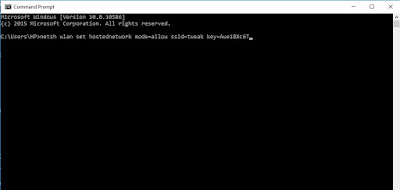
Now press Enter and wait for about 5 seconds ,itll tell you if you have successfully created a hosted network. Now next thing is to start your already created hotspot.
Type in netsh wlan start hostednetwork and press Enter
To stop your hotspot type in netsh wlan stop hostednetwork and press Enter
Youre not done yet my friend. Now to fully make this work,you have to turn on the Sharing feature. Go to the Network Sharing Center,you can see this option by right clicking on your Wifi icon at the right bottom corner.
Click Change Adapter Settings
Now youll see the hotspot you created with the hotspot name written on it. Right Click on it and select Properties and select the Sharing tab,tick the option that says "Allow other network users to connect through this computers internet connection" go to the next drop down option that says Select private network connection,youll see the hostednetwork name you created,select it. Now you can fully share you internet connection with anyone.
Available link for download
Friday, September 16, 2016
Download Software Any Video Converter 5 9 7 2016 New 16dotcom Free
Download Software Any Video Converter 5 9 7 2016 New 16dotcom Free
Description
 Download Software Any Video Converter 5.9.7 | 2016 | New | 16dotcom | Free - Any Video Converter is an All-in-One video converting tool with easy-to-use graphical interface, fast converting speed and excellent video quality. It allows you to effortlessly convert video files between every format! It can convert almost all video formats including DivX, XviD, MOV, rm, rmvb, MPEG, VOB, DVD, WMV, AVI to MPEG-4 movie format for iPod/PSP or other portable video device, MP4 player or smart phone. It also supports any user defined video file formats as the output. Any Video Converter makes it easy for anyone to enjoy the any format video with your iPod, PSP, mobile phone or MP4 player.
- User-friendly interface that is easy to use.
- Converts all video formats to Apple iPod Video, Sony PSP and more
- Batch convert any video formats including avi, wmv, asf, mpg, mp4, etc.
- Support DivX and Xvid avi format as importing and exporting video
- Support default video/audio settings or user customized parameters for video and audio.
- Has the option to preview the video in real-time before conversion .
- Worlds fastest video conversion speed with stunning video and audio quality.
- Supports adjust many video/audio options for MP4 files. For example, video/audio sample rate.

Available link for download
Subscribe to:
Posts (Atom)