Showing posts with label wifi. Show all posts
Showing posts with label wifi. Show all posts
Tuesday, February 21, 2017
Download WiFi Security for free
Download WiFi Security for free

WiFi Security+
Communication
[Download Link >>]
version:1.3
rating: 3.3
rating count: 2156
updated: 2015-03-05
size: 5.4 MB
installs: 5000
cost: UAH20.20
Available link for download

Thursday, December 22, 2016
DroidSheep WIFI Android Tools
DroidSheep WIFI Android Tools
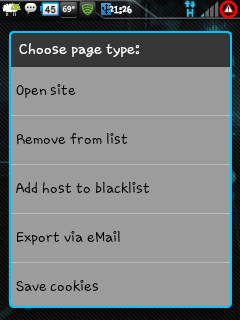 DroidSheep is wifi android tools to monitor network traffic for online account access rights. Users who run DroidSheep wifi android tools can use the accounts of victims, gain access to sites that dont use SSL secure and encrypted connection / HTTPS.
The workings of DroidSheep WIFI Android Tools :
1. Android version 2.1 above (Root)
2. Wireless Network / Wifi (can be tried in the hotspot)
3. Connect you HH with wifi.
4. DroidSheep Install and run it, then start the scan
5. Once completed, the results will capture some of the URL
6. And select a list, select the open site, if successful, it means youre spoofing using a managed account in the hijack.
2. Wireless Network / Wifi (can be tried in the hotspot)
3. Connect you HH with wifi.
4. DroidSheep Install and run it, then start the scan
5. Once completed, the results will capture some of the URL
6. And select a list, select the open site, if successful, it means youre spoofing using a managed account in the hijack.
WARNING : " Before practice, I warn you, all you do is your responsibility and use it wisely as a medium of knowledge and learning only ".
DroidSheep WIFI Android Tools
DroidSheep WIFI Android Tools
Available link for download
Saturday, October 22, 2016
Easiest Way to create a Wifi Hotspot on your PC Without Any Software
Easiest Way to create a Wifi Hotspot on your PC Without Any Software
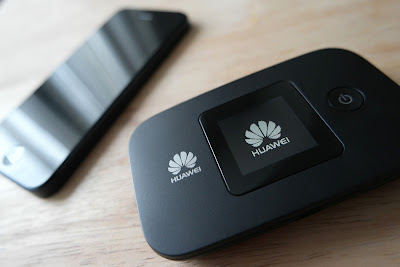
Hi,todays tutorial is going to be on how to turn on the mobile hotspot feature on your computer/PC. We all know theres no straight button option for turning on mobile hotspot on your PC,although Microsoft is planning on bringing this feature in the next windows 10 build update which will be available pretty soon.
Now the only way you can actually turn on your mobile hotspot is through the Command Prompt(CMD). Youll have to run it as an administrator for it work perfectly. Have you done that??
Now type the following in your CMD netsh wlan set hostednetwork mode=allow ssid="your_hotspot_name" key="your_hotspot_password" (Please enter your desired hotspot name and password without the quotes).
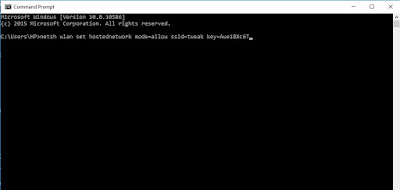
Now press Enter and wait for about 5 seconds ,itll tell you if you have successfully created a hosted network. Now next thing is to start your already created hotspot.
Type in netsh wlan start hostednetwork and press Enter
To stop your hotspot type in netsh wlan stop hostednetwork and press Enter
Youre not done yet my friend. Now to fully make this work,you have to turn on the Sharing feature. Go to the Network Sharing Center,you can see this option by right clicking on your Wifi icon at the right bottom corner.
Click Change Adapter Settings
Now youll see the hotspot you created with the hotspot name written on it. Right Click on it and select Properties and select the Sharing tab,tick the option that says "Allow other network users to connect through this computers internet connection" go to the next drop down option that says Select private network connection,youll see the hostednetwork name you created,select it. Now you can fully share you internet connection with anyone.
Available link for download
Sunday, September 4, 2016
Driver All LAN dan Wifi
Driver All LAN dan Wifi
Kebanyakan dari kita senang mengutak - ngatik laptop maupun PC, seperti halnya instal ulang, mengganti windows dsb..akan tetapi sering kita tidak menyadari,tidak memiliki driver Laptop / PC itu sendiri..memang di dalam penjualan laptop ada yang sering diberikan kaset drivernya tetapi itu tidak semua laptop diberikan apabila menggunakan OS Genuine..
Oke, disini saya akan menshare driver wifi all in...driver ini bernama 3DPNet..ukurannya sekitar 48 MB..driver ini cukup memudahkan kita karena cara menggunakannya cukup sederhana..berikut previewnya..

untuk agan - agan yang membutuhkan bisa klik disini
Available link for download
Subscribe to:
Posts (Atom)