Monday, February 6, 2017
Easiest way to capture desktop screen shots
Easiest way to capture desktop screen shots
Sometimes you require to take screen shot of your desktop in case you like the wallpaper or seem to have a problem or capture all desktop junk or want to send information to a client. And for this simple 10 seconds job , there are many many professional softwares like snagit , picpick , greenshot etc which you need to pay for for getting many quality features .
Still you dont need a dedicated screen capture app for this job as it is damn easy to do it from your keyboard for any OS .
#1 For Windows Operating System
On Windows systems, Press Print Screen key.
This button is most probably on right corner of your keyboard , adjacent to scroll lock .
This takes a snapshot of your the desktop screen and places it in your clipboard.
Now open any image editor like Paint , or MS office and click Edit - Paste or press Ctrl + V.
Now you will be able to see ditto pic of desktop screen as if you have taken a photo from a camera :P .
Save this new image in any format you want .
Note : In order to capture the active window Press ALT + Print Screen.
Other image editors that can be used are : Adobe PhotoShop, Paint Shop Pro, FireWorks etc .
#2 For Macintosh System [ Apple ]
Hit Apple + Shift + 3.
#3 For Linux System
Linux systems always come with a free screen capture app . You just check the app in terminal directory and choose the time after which screenshot must be captured . Works for KDE and other desktops like Ubuntu , Kubuntu , Fedora etc
Available link for download

Wednesday, February 1, 2017
Easiest Method To Generate The IMEI Number Of Any Android Phone
Easiest Method To Generate The IMEI Number Of Any Android Phone

In this Post, i will be showing you a new method of generating IMEI numbers easily, I can say this method is the best method of Generating IMEI Numbers and i know at the end of this posted you will be smiling and sharing this with other of your friends on social media using the Share Buttons.
Here, we will be generating IMEI when the first 8,9,10,11 digits have been given.
I discovered An Andriod Application called "IMEI TWEAKING ANALYZER", this Application makes it pretty much easier to tweak IMEI Numbers.
I will be taking my time to explain this method of using the IMEI TWEAKING ANALYZER, so no one will be left out of the benefits from IMEI TWEAKING, such as Free Mega Bytes.
How To Easily Tweak Yout IMEI Numbers!
Two Applications Are needed here
1. Imei Analyser Download Here
2. MTK Engineering Click Here
How To Generate The Complete IMEI Of Any Phone?
==>First of all, if not all digits, get the first 8digit imei of that particular phone.
==>Download and Install imei Analyser from the link above.
==>Open imei analyser and copy, paste the first 8digit number of that phones imei you got earlier on the space provided.
==>Add up any number to it, so it becomes 14digits.
==>Now Hit Analyse to get the last 1 digit(check digit) to make it a total of 15digits.
==>Finally use MTK engine to tweak it to your phone.
2. Add any 2 digits of your choice to make it 14 digits.
That’s All. Hope this Helps! For More info Drop a Comment!
Available link for download
Wednesday, January 4, 2017
Easiest way to take screenshot from micromax devices witout root
Easiest way to take screenshot from micromax devices witout root
Best way is using the hard keys
VOLUME DOWN + POWER KEY for more than 3 sec.
Available link for download
Sunday, November 20, 2016
Easiest Way To Own a Laptop Or Car For Free In Nigeria
Easiest Way To Own a Laptop Or Car For Free In Nigeria

Have you been dreaming of getting a Laptop or a car of your with little or no capital at all?
Well Helping Hand International (H2i) Is making that possible for thousands of Nigerians.
Meet H2i
Welcome to Helping hands international (H2i)
The core objective of Helping Hands Intl i is to help people who are less privileged. The founder was inspired to run & achieve this objective by connecting more partners so as to reach more less privileged. Every member is therefore regarded as Help partner.
Since all NGO depend on donations, grants & philanthropist supports, the founder Mrs Luzviminda Mac- Elvis thought of changing the paradigm. This is how the idea was adopted.
Every member is require to donate $40 or #6,600 and payments are in dollars.
The job required of u is to raise funds for the company by referring two people then teach ur two to also get their two & their twos also bring twos. So long as that process of each person bringing their two continues every one will enjoy residual income for life.
NOW LET ME Tell U HOW it WORKS:
When u join our vision of given a helping hand to the needy, less privilege, widow, motherless & the disabled, u become our help partner & as our partner will believe in making ur life meaningful.
H2i touches & empowers members lives financially as well in these ways:
- Interest free LOAN
- Humanitarian support
- Asset/Property support service
- Trade & skill acquisition service
- Income opportunity
- A LAPTOP or an ipad
- A Brand new Hyundai Elantra car
-Yearly global pool
-House of your own
-All expenses paid trips
-Infinity Bonus
-Residual income for life
-Free educational fund for your children
When u join & refer two people & they do the same, u are paid a commission instantly in which u can cash immediately or u use it to register any of ur downlines when it accumulates to $40. Now the whole idea here is to help us all with extra cash in our pockets, residual income which has been going on since Dec 2013.?
H2is Fan Club is a community of positive - minded people. A place where members are encouraged to believe in themselves & their God-given ability to succeed. It is a circle of people who believe they can make a difference in the life of others no matter how small.
You are considered a good example of a Help partner with H2i if everyone who comes around u sees a reason to aspire higher & become better. H2i feeds the poor, clothe them & house them.
Incentives load down:
Stage 1: You get $26 or $58
Stage 2: You will earn a minimum of $1000 (N165,000), & qualify for a brand new apple Ipad worth over N130,000 & will also be given a CUG line for limitless communication.
Interestingly, achieving all this in less than 2weeks of joining is very possible depending on ur determination.
In stage 3, You earn $3000 & a brand new HYUNDAI ELANTRA (the Latest Model) worth about N4.5m in the market now! December, this year, Nigerians will witness the 3rd car award to Nigerians by H2i.
- Also, $1000 cheque each handed over to two (2) non-members of H2i , whom u personally recommended to H2i as less privileged. This is grant; Not a loan! And it is given non-members by H2i courtesy of u.
- You also have an opportunity for an all expense Intl exotic holiday sponsored by H2i.
Stage 4 offers opportunity to earn another cash of $6000 & a brand new jeep worth $27,000 - the HYUNDAI ix35!. u will also be privileged to empower a less privileged home. This is a grant in Millions.
Stage 5 offers over $12,000 cash, $40,000 housing fund, an opportunity for an all expense international exotic holiday sponsored by H2i.
- The infinity bonus for life & much more.
Infact, the benefits u enjoy in H2i is enormous & cant be exhausted.
I challenge u to explore this simple but powerful opportunity. I dare u to give it attention! It is not just a Multi-Level Marketing agenda. It is a movement with a great motive to destroy scarcity, lack & want in peoples lives.
H2i has a good number of sponsors Like GLO, Diamond Bank, Hyundai, Apple Inc, Hp etc who believe strongly in CSR (Corporate Social Responsibility).? The Ipads come from Apple Inc, who are partners with H2i.
So build a solid future today by becoming a Help Partner.
www.helpinghands international.biz
Screenshots Of The Past Winners:


Available link for download
Sunday, November 6, 2016
Easiest Way to Download Youtube Videos in Mobile
Easiest Way to Download Youtube Videos in Mobile

We all know that youtube is the home of videos. Any video we need, we just visit youtube, search for it and watch it. Many times you may have watched a video, liked it and wanted to download it. But youtube does not provide any downloading option. But fortunately, it is possible to download youtube videos and there are many ways to do it. But many of them don’t work with mobile phones. Here I share with you a simple way to download youtube videos in mobile phone whether it is a smartphone, java phone or any other phone with just an internet connection.
The best part of this method is that you can download the videos in the format you like or need. And also you no longer need to copy and paste the url of the youtube video into other site to download it. By this way users of opera mini who do not have copy and paste option (opera mini 4.1 and other similar versions) can download youtube videos. So lets see how exactly to do it.
Whenever you watch or view a video page in youtube, you will see its url in the address bar something like:

www.youtube.com/watch?v=……………..
Or
m.youtube.com/watch?v=…………
Now delete everything before youtube. Now the url looks like:
youtube.com/watch?v=………
Now just add ss before youtube as:
ssyoutube.com/watch?v=………
Now press go or enter to visit the address you have just written. Then you will be taken to a page where you can download the required video in the format you like.

Hope you all like and enjoy the trick! Don’t forget to share!
Available link for download
Saturday, October 22, 2016
Easiest Way to create a Wifi Hotspot on your PC Without Any Software
Easiest Way to create a Wifi Hotspot on your PC Without Any Software
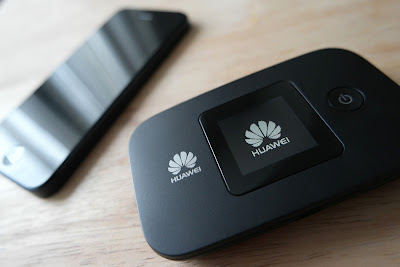
Hi,todays tutorial is going to be on how to turn on the mobile hotspot feature on your computer/PC. We all know theres no straight button option for turning on mobile hotspot on your PC,although Microsoft is planning on bringing this feature in the next windows 10 build update which will be available pretty soon.
Now the only way you can actually turn on your mobile hotspot is through the Command Prompt(CMD). Youll have to run it as an administrator for it work perfectly. Have you done that??
Now type the following in your CMD netsh wlan set hostednetwork mode=allow ssid="your_hotspot_name" key="your_hotspot_password" (Please enter your desired hotspot name and password without the quotes).
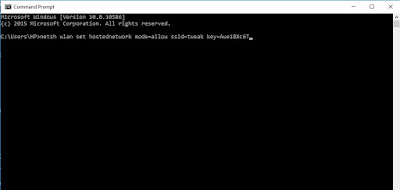
Now press Enter and wait for about 5 seconds ,itll tell you if you have successfully created a hosted network. Now next thing is to start your already created hotspot.
Type in netsh wlan start hostednetwork and press Enter
To stop your hotspot type in netsh wlan stop hostednetwork and press Enter
Youre not done yet my friend. Now to fully make this work,you have to turn on the Sharing feature. Go to the Network Sharing Center,you can see this option by right clicking on your Wifi icon at the right bottom corner.
Click Change Adapter Settings
Now youll see the hotspot you created with the hotspot name written on it. Right Click on it and select Properties and select the Sharing tab,tick the option that says "Allow other network users to connect through this computers internet connection" go to the next drop down option that says Select private network connection,youll see the hostednetwork name you created,select it. Now you can fully share you internet connection with anyone.
Available link for download